Read and find
Reading Mode, thumbnails, outline navigation, search, zoom and printing.

 alphaPDF
PDF workspace for Chrome
alphaPDF
PDF workspace for Chrome
Merge, split, compress and annotate PDFs for free. alphaPDF Pro adds PDF to Word conversion and OCR. Document processing stays on your device.
Free essentials · Pro is a one-time purchase · No recurring charge
See how alphaPDF compares with Acrobat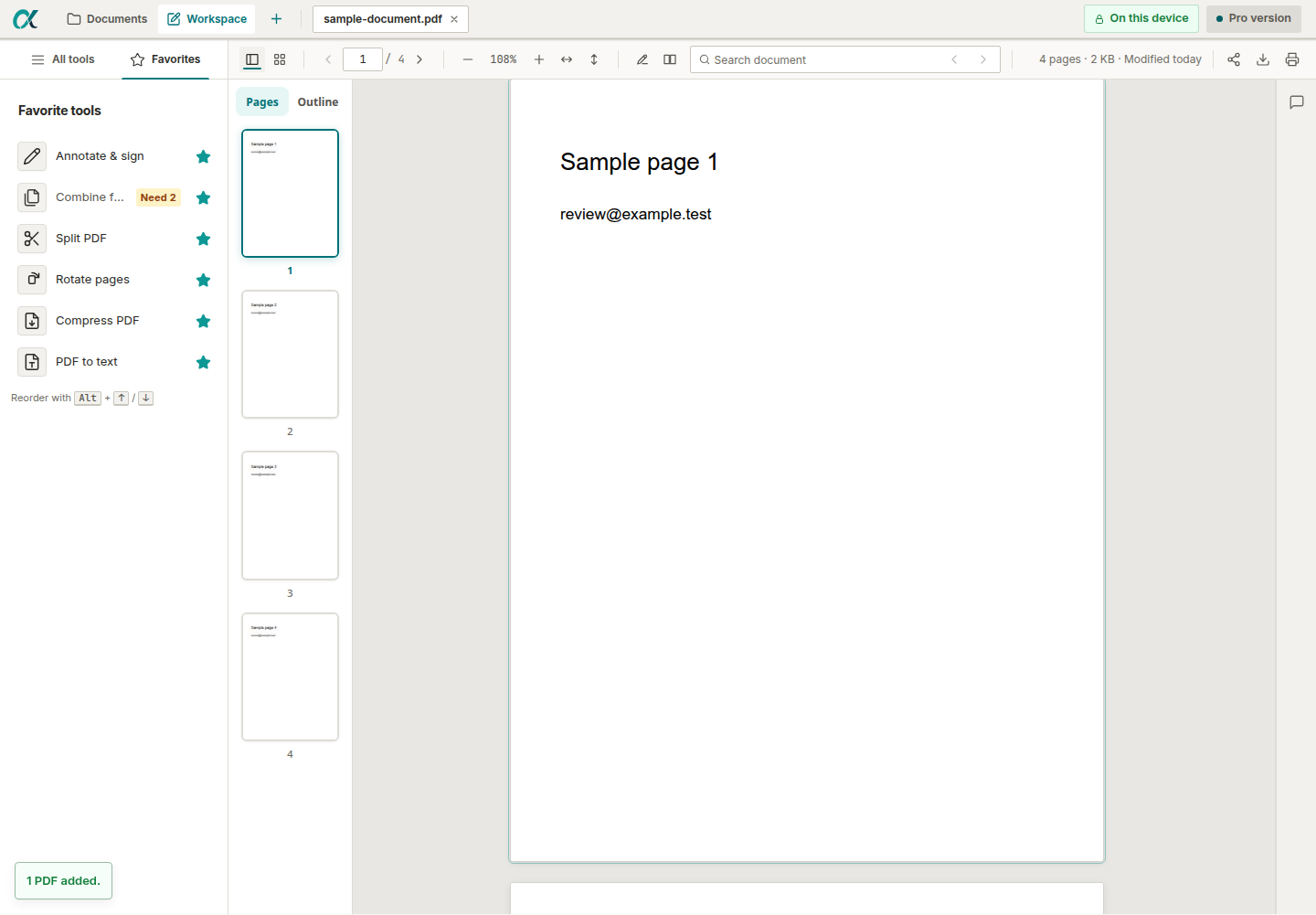
Local-firstPDF contents are not uploaded to alphaPDF
Useful for freeReading, annotation and common page tools
One purchasePro has no subscription or recurring charge
A practical document desk
Open a PDF from your computer or a page you choose, then keep the work together in Documents and Workspace.
Reading Mode, thumbnails, outline navigation, search, zoom and printing.
Combine, split, reorder, rotate, crop, replace and add pages without leaving Chrome.
Annotations, comments, drawings, attachments and visual signatures.
Pro adds OCR, secure redaction, forms, Bates numbering, sanitisation and batch workflows.
PDF tools and guides
Learn the steps, check what is free and review the result before sharing your document.
alphaPDF & Adobe Acrobat
Merge, split, organise and convert PDFs for free with alphaPDF. These tools sit beyond Adobe’s free desktop Reader and are included in paid Acrobat plans.
Common document jobs, included free.
Free tools process your files locally in Chrome.
Use Free without an alphaPDF account. Your device’s capacity still matters.
| What you want to do | alphaPDFFree · $0 | Acrobat ReaderFree desktop app | Paid AcrobatStandard / Pro |
|---|---|---|---|
| Read, print, comment & visually sign | Free | Free | Included |
| Merge & split PDFs | Free | Not included | Subscription |
| Reorder, delete, insert & replace pages | Free | Not included | Subscription |
| Crop pages & save rotated pages | Free | Not included | Subscription |
| Convert PDF pages ↔ JPEG / PNG | Free | Not included | Subscription |
| Compress PDFs | Free | Not included | Subscription |
| Fill existing interactive PDF form fields | Pro | Free | Included |
| Export an editable Word document | Pro | Paid upgrade | Subscription |
| OCR: make scanned PDFs searchable | Pro | Not included | Pro subscription |
| Edit existing PDF text in place | Not supported | Not included | Subscription |
Adobe also offers online merge, split, conversion and compression tools with free usage limits. Its published FAQ says most tools allow one transaction without signing in; signed-in free users can try premium tools once per rolling 30 days. These online services upload files to Adobe’s servers. The table above compares desktop tools.
alphaPDF is built for local PDF work in desktop Chrome. Acrobat offers broader desktop and mobile support, existing-text editing, certificate signing and managed e-signature workflows. alphaPDF’s visual signatures are not certificate signatures or a managed signing service.
For alphaPDF’s advanced tools, Pro is US$59 once, including applicable transaction tax, while alphaPDF remains supported. Adobe also sells Acrobat Pro 2024 with a three-year, non-recurring desktop licence.
Private by design
PDF contents, annotations, OCR and exports are processed locally in Chrome. alphaPDF servers handle only checkout, licence activation, recovery and limited installation management.
If you explicitly import a PDF from a website, Chrome may use your existing site cookies locally to retrieve it. The PDF is not sent to Maskia.
Read the Privacy Policy →Simple pricing
No monthly plan, no annual renewal and no surprise paywall after a long operation.
Free
$0
Reading, search, annotations and a useful collection of everyday PDF tools.
Add to ChromealphaPDF Pro
$59
One-time purchase, including applicable transaction tax. Sold through Link, Stripe's merchant of record.
Get alphaPDF ProFree and Pro
| Capability | Free | Pro |
|---|---|---|
| Read, search, print and organise documents | Included | Included |
| Annotate, visually sign and add images | Included | Included |
| Combine, split, reorder, rotate and crop pages | Included | Included |
| Convert pages, extract images and attachments | Included | Included |
| OCR, searchable scans and text export | — | Included |
| Secure redaction and sanitisation | — | Included |
| Forms, bookmarks, links, Bates numbers and reusable headers | — | Included |
| Batch preparation, document comparison and cryptographic seals | — | Included |
Good to know
No. Document contents and transformations stay in Chrome. Network access is used for the specific website PDF you ask Chrome to retrieve, checkout, licence activation and recovery.
No. Pro is a one-time purchase with no recurring charge. It covers the Pro tools listed when you buy it while alphaPDF remains supported.
Checkout is provided through Stripe Managed Payments. Link acts as merchant of record and handles payment, applicable transaction taxes and transaction support in the jurisdictions it covers. Your final total is shown before purchase.
You can activate up to three installations you control. The recovery flow lets you deactivate an old installation when moving to another computer.
The initial Pro purchase has a voluntary 30-day money-back guarantee, in addition to any stronger rights required by law.
No. alphaPDF is a practical local-first toolkit. It does not claim Adobe-compatible certificate signing, managed e-signatures or in-place editing of arbitrary source text.
The first release is built for current desktop Google Chrome versions that support Manifest V3 and the Side Panel API.